
The Designer's Nightmare: Why Your Feedback Loops Are Too Slow
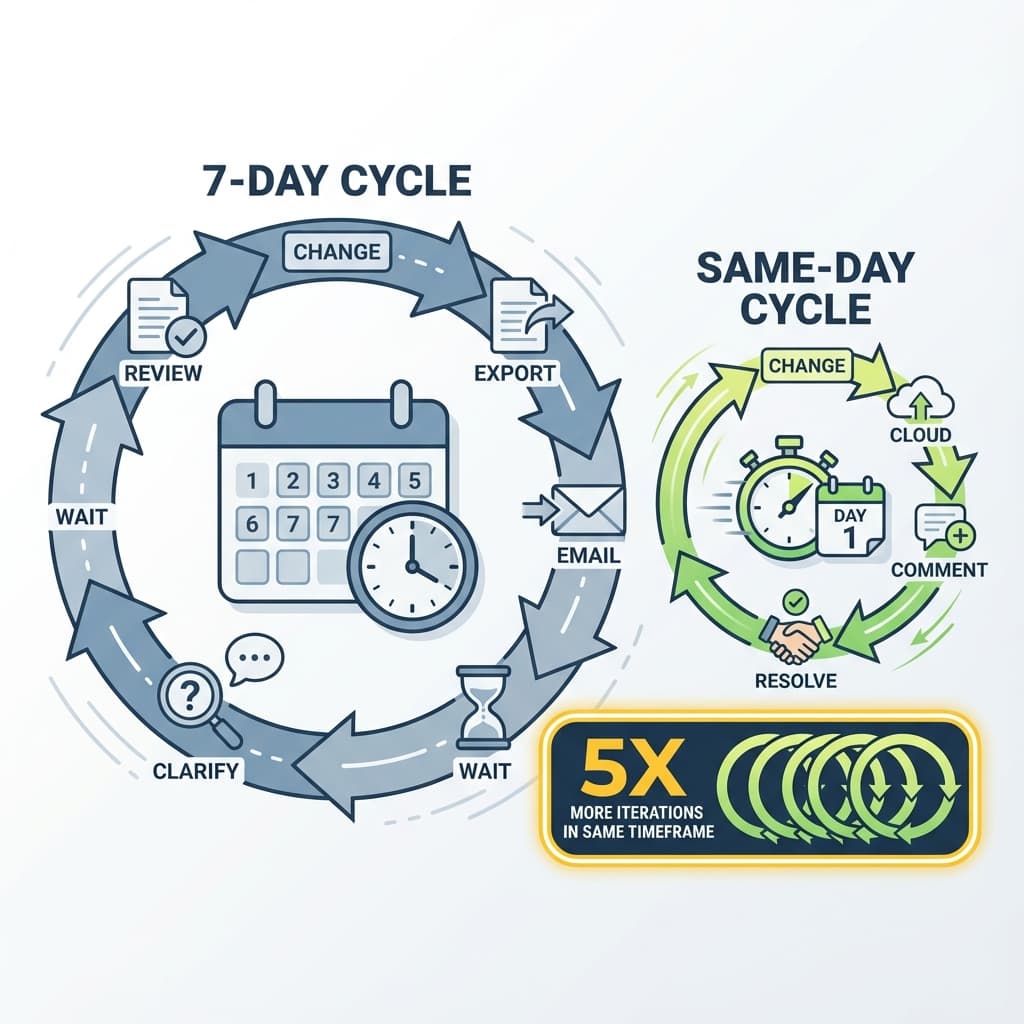
You made a change. Now you wait. For the render. For the email reply. For the meeting. By the time feedback arrives, you've context-switched three times and forgotten why you made the change in the first place.
This is the designer's nightmare: slow feedback loops that destroy momentum and drag projects into calendar month timelines when they should take weeks.
The Psychology of Iteration Speed
In creative work, feedback latency directly impacts design quality—because it breaks flow and erodes context. Here's why:
- Flow state: Designers do their best work in uninterrupted focus periods. Waiting for feedback interrupts flow.
- Context decay: The longer between action and feedback, the more mental context is lost. "Why did I do this?" becomes common.
- Risk aversion: When feedback is slow, designers avoid bold changes. Why try something risky if you won't know if it works until next week?
- Iteration count: Time-boxed projects get fewer iteration cycles when each cycle takes days instead of hours.
Where Feedback Gets Stuck
In a typical hardware design workflow:
| Stage | Delay | Why It's Slow |
|---|---|---|
| Local render preview | 5-30 minutes | CPU/GPU limitations, especially on Mac |
| Export and email | 10-15 minutes | File prep, compose email, wait for send |
| Stakeholder responds | 1-3 days | Email buried, other priorities, meetings |
| Clarification loop | 1-2 days | "Which left side?" back-and-forth |
| Calendar alignment | 3-5 days | Finding a meeting slot across timezones |
Total: A single design iteration can take 5-10 days. Projects with 10+ iterations take months of calendar time.
What Fast Feedback Looks Like
The goal: minutes between action and response, not days.
Instant Visual Feedback
Instead of waiting for local renders:
- Cloud rendering returns results in ~10 seconds after initial processing (quality settings vary)
- See material changes immediately
- No thermal throttling, no fan noise, no waiting
Async-First Collaboration
Instead of scheduling meetings:
- Share a link; stakeholder reviews whenever they're free
- Feedback comes in as notifications, not appointments
- Multiple stakeholders review in parallel, not sequence
Spatial Precision
Instead of email clarification loops:
- Reviewer clicks exactly on the feature with the issue
- Camera angle and location captured automatically
- Zero ambiguity = zero clarification emails
The Math: Feedback Speed vs. Design Quality
Given a 4-week design phase:
| Feedback Cycle Time | Cycles Possible | Design Quality |
|---|---|---|
| 7 days | 4 cycles | Functional minimum |
| 2 days | 10 cycles | Good iteration |
| Same day | 20+ cycles | Real refinement |
5x iteration cycles = 5x opportunities to catch problems, explore alternatives, and refine details.
Breaking the Meeting Dependency
Meetings feel productive but scale poorly:
- 5 people × 1 hour = 5 hours of team time
- Calendar coordination adds 2-5 day lag
- Decisions made verbally aren't documented
- Only works during overlapping work hours
Async spatial comments:
- 5 people × 10 min each = 50 total minutes
- Zero calendar coordination
- Every comment logged and auditable
- Works across any timezone
A 1-Week Upgrade Plan
Define your “feedback SLA”
Pick a target turnaround for internal feedback (same-day is a good starting point). Make it explicit.
Replace one meeting with an async link
Send a view-only link + a deadline. Ask reviewers to comment directly on the part.
Standardize feedback quality
Require each comment to include: what to change + why it matters. No more “looks off.”
Close the loop visibly
Mark comments resolved, post a short summary, and keep the thread as the source of truth.
Key Takeaways
- ✓Slow feedback breaks flow state and limits iteration count
- ✓Cloud rendering eliminates the local GPU bottleneck
- ✓Async commenting replaces meeting dependencies
- ✓Spatial precision eliminates clarification delays
FAQ
Won't stakeholders feel rushed if feedback is expected faster?
Async doesn't mean urgent. It means "feedback when you're available" rather than "schedule a call." Most prefer this.
What about complex decisions that really do need discussion?
Reserve meetings for the 20% of issues that need synchronous debate. Use async for the 80% that are "looks good" or "change this specific thing."
How do I get my team to adopt async habits?
Start by replacing one recurring meeting with a shared 3D link + request for comments by EOD. Show the time savings.
Design faster. Iterate more.
Reific keeps the feedback loop tight: render in ~10 seconds after processing, share a link, and resolve comments in one thread.
Speed Up Your Workflow