
Async Design Reviews: Cutting the Feedback Loop in Half
"Can you rotate it 45 degrees?" "No, the other bolt." "Can we see it in matte black?"
If these questions fill your inbox, your design review process is broken. Text-based feedback fails when the context is spatial.
The Precision Gap
Consider how feedback typically flows in engineering:
- Engineer sends render via email
- Stakeholder replies: "The clearance on the left side looks tight"
- Engineer asks: "Which left side? From what angle?"
- Stakeholder describes in text, gets it wrong
- Engineer makes the wrong change
- Repeat until everyone is exhausted
The core problem: email is linear, but 3D design is spatial. Describing a geometric issue in text is inherently lossy and error-prone.
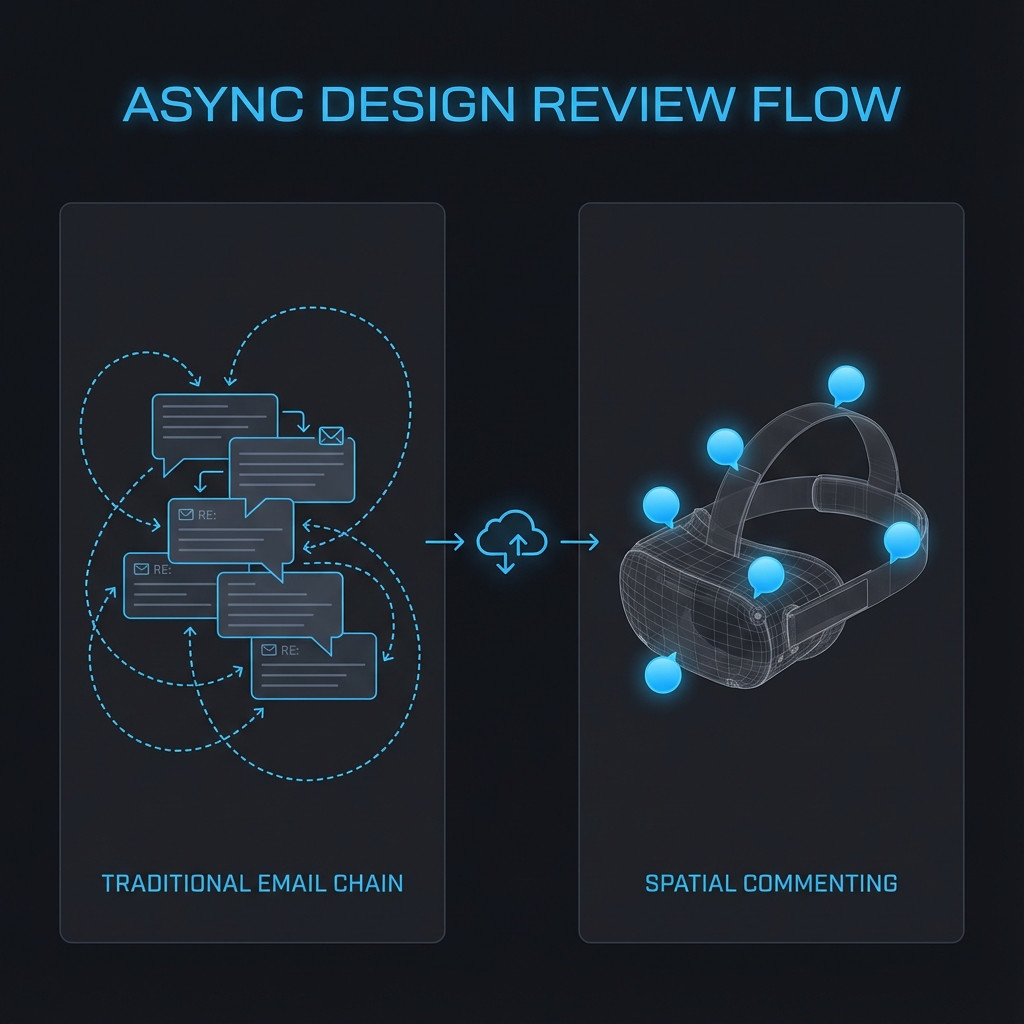
The Cost of Ambiguity
In practice, adding visual context dramatically improves review efficiency. Clearer shared visuals reduce clarification loops and speed approvals—especially when feedback is spatial.
| Metric | Text-Only Feedback | Spatial Comments |
|---|---|---|
| Clarification loops | Often multiple back-and-forths | Often fewer (context included) |
| Time to resolve a single issue | Days (calendar time) | Hours (same day) |
| Misinterpretation risk | Higher | Lower |
These are common patterns; results vary by team, model complexity, and review habits.
The Fix: Pin the Problem
Reific brings "Google Docs" style commenting to 3D renders:
Asynchronous by Design
Spatial commenting enables true async collaboration across time zones:
- No scheduling: Stakeholders review on their own time
- No timezone pain: Engineer in Munich, reviewer in San Francisco—both work at their own pace
- Documented history: Complete audit trail of all feedback and resolutions
- Faster iteration: Surface-level changes (color swaps) don't require full re-renders
Where Async 3D Review Fits: Real Workflows
This isn't just for internal engineering. Here are specific workflows where spatial comments replace painful email chains:
- Supplier Feedback: Contract manufacturer reviews design for manufacturability. They pin comments on features that need draft angle changes.
- DFMA Reviews: Design for Manufacturing and Assembly feedback happens in context, not in a PDF markup.
- Cross-Timezone Engineering: Munich designs during their day; San Francisco reviews during theirs. No 6am calls needed.
- Executive/Investor Updates: Non-technical stakeholders can leave impressions directly on the 3D view without CAD access.
- Customer Co-Design: Customer points to the exact feature they want changed. No ambiguity about "the thing on the left."
Comparison: Traditional vs Spatial Review
| Workflow Step | Traditional (Email) | Spatial Comments |
|---|---|---|
| Share design | Export PNG, attach to email | Send link |
| Give feedback | Write paragraphs describing location | Click + type |
| Clarify feedback | Reply-all, more screenshots | Reply in thread, same view |
| Track changes | Search through email threads | All comments in one place |
Key Takeaways
- ✓Text descriptions of 3D problems are inherently ambiguous
- ✓Spatial comments capture exact location, camera angle, and context
- ✓Async reviews work across time zones without scheduling meetings
- ✓Audit trails document every feedback cycle for compliance
FAQ
Do reviewers need CAD software installed?
No. They view and comment in their web browser. No downloads, no licenses.
Can I use this with external clients?
Yes—share a secure link. They see pixels only, not source geometry. See: Zero-Trust Sharing
How do comments stay attached when the design changes?
Comments are version-tagged. When you upload a new revision, old comments remain visible with the original view for context.
Kill the email chain.
Reific turns async review into a single link: reviewers click the exact feature, comment in place, and you keep the full decision trail.
Try Collaboration Tools