
Accelerating DFM Reviews: How to Get Manufacturer Feedback Before Tooling
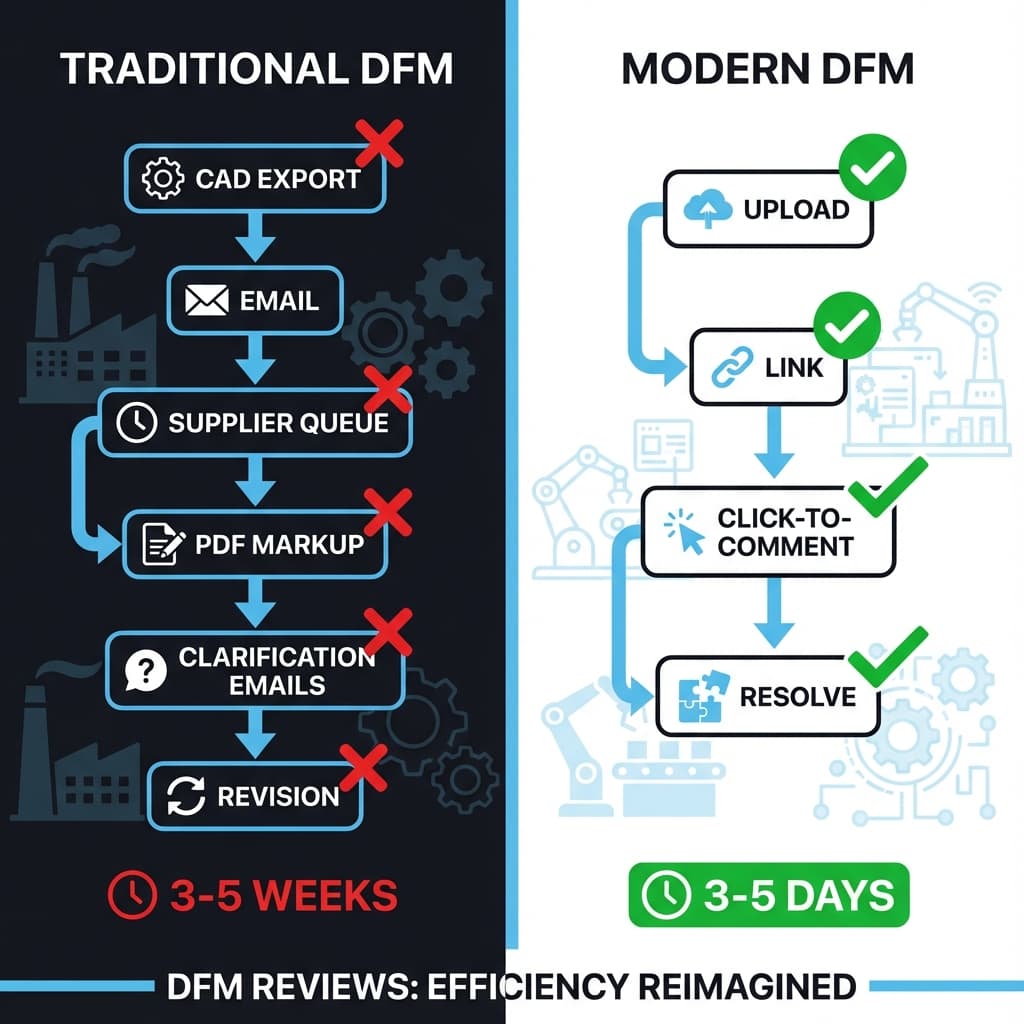
You've spent months on a design. You send it to your contract manufacturer for DFM review. They come back with 15 changes—none of which you can discuss effectively over email.
The DFM (Design for Manufacturing) feedback loop is one of the slowest, most expensive processes in hardware development. And most of the delay is communication overhead, not engineering work.
The DFM Feedback Loop Problem
DFM is inherently iterative. Manufacturers see things engineers miss:
- Draft angles that won't release from molds
- Wall thicknesses that will cause sink marks
- Undercuts requiring side actions ($$$ in tooling)
- Tolerances that can't hold without secondary ops
But the feedback process is broken:
- Week 1: Send STEP file to supplier
- Week 2: Supplier reviews (when they have time)
- Week 3: Receive PDF with redlines or marked-up screenshots
- Week 4: Back-and-forth emails clarifying "which rib?"
- Week 5: Redesign and repeat
Each cycle takes 3-5 weeks. Complex products go through 3-5 cycles. That's 3-6 months of DFM alone.
Where the Time Goes
| Activity | Time | Why It's Slow |
|---|---|---|
| Waiting for supplier to start review | 3-7 days | Your job is in their queue |
| Supplier creates marked-up PDF | 1-2 days | Manual screenshot + annotation |
| Email exchange clarifying issues | 3-5 days | "Which wall?" "No, the other one" |
| Design changes | 1-3 days | This is the actual work |
| Re-exporting and re-sending | 0.5-1 day | File too large for email, use Dropbox... |
The actual design work is often less than 20% of the cycle time. The rest is communication overhead.
A Better DFM Workflow
Step 1: Share a Link, Not a File
Instead of emailing a 200MB STEP file:
- Upload to a shared 3D viewer
- Send a link that works in their browser
- They can spin, zoom, and inspect without CAD software
Suppliers often don't have compatible CAD versions. A web viewer works for everyone.
Step 2: Let Them Click, Not Describe
Instead of a PDF with circled areas:
- Supplier clicks directly on the problem feature
- Leaves a comment: "Add 2° draft here for ejection"
- The exact camera angle and location are captured
Engineers receive notifications with precise context. No "which wall?" emails.
Examples: High-Quality DFM Comments
- “Add 2° draft on this inner wall for ejection.”
- “Increase wall thickness here to avoid sink/warp.”
- “This undercut likely needs a side action—can we redesign the feature?”
- “Tight clearance at this rib root; consider a larger fillet to reduce stress.”
The goal is clarity: what to change, why, and where—all in one place.
Step 3: Iterate in Place
Instead of re-exporting after each change:
- Upload the new revision to the same project
- Previous comments remain visible (version-tagged)
- Supplier verifies their feedback was addressed
Security Consideration: View-Only Until Contract
DFM often happens before contracts are finalized. You're sharing with potential suppliers who may also be quoting competitors.
"We share renders for quoting. Actual CAD files only after signed NDA and PO."
— VP Engineering, Consumer Electronics Startup
With "pixels, not files" sharing, suppliers can review the design and flag DFM issues without receiving extractable geometry. You get useful feedback while protecting IP.
See: Zero-Trust Sharing
Time Savings: Before and After
| Metric | Email Workflow | Spatial Commenting |
|---|---|---|
| Time to first feedback | 1-2 weeks | 1-3 days |
| Clarification cycles | 2-4 per issue | 0-1 |
| Full DFM iteration | 3-5 weeks | 1-2 weeks |
| Total DFM phase (3 cycles) | 9-15 weeks | 3-6 weeks |
Key Takeaways
- ✓DFM delays are mostly communication overhead, not engineering time
- ✓Spatial comments eliminate “which feature?” clarification loops
- ✓View-only links let you get feedback without sharing CAD files
- ✓Real DFM iteration can shrink from weeks to days
FAQ
Don't suppliers need the actual STEP file to quote tooling?
For final tooling quotes, yes. But initial DFM review—identifying issues—can happen on view-only renders. Share CAD after contract.
How do I get my overseas supplier to use a new tool?
They click a link. If they can use a web browser, they can use this. No training, no Chinese/English language CAD mismatch.
What about tolerances and GD&T—do those come through?
Add dimensions as overlay text or link to drawing PDFs. The 3D view provides context; documents provide specs.
Ship faster. Get DFM right the first time.
Reific makes supplier DFM reviews simple: share a view-only link, collect spatial comments pinned to parts, and keep revision history in one place.
Accelerate DFM