
Stop Emailing CAD Files: Why Pixel-Based Sharing is Better
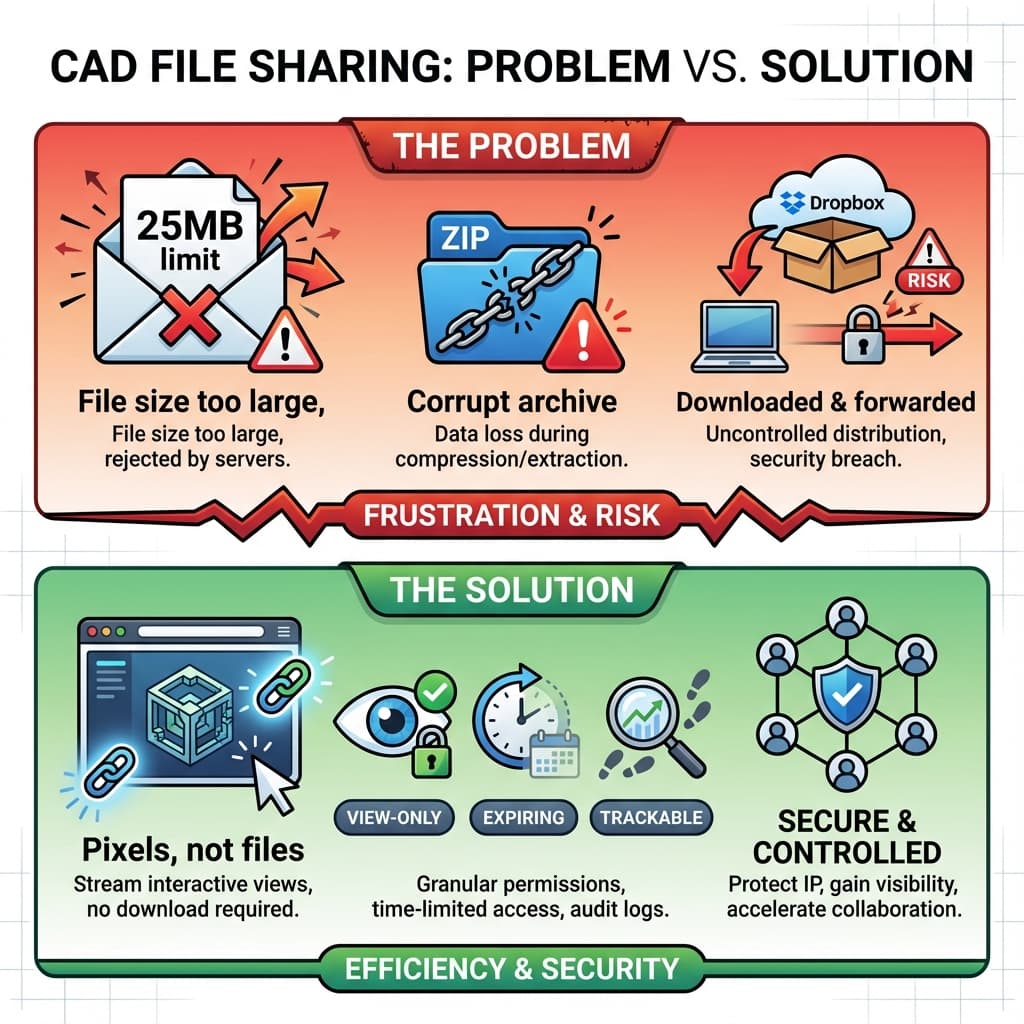
"I have a 280MB STEP file and need to get it under 20MB to email it." Sound familiar?
Engineers post this complaint constantly. The reality: CAD files are too large for email, too risky for Dropbox, and too hard for most recipients to actually open.
The Problem with Emailing CAD Files
Problem 1: File Size Limits
Gmail caps attachments at 25MB. Outlook at 20MB. Your assembly is 300MB. Now you're zipping, splitting, using WeTransfer, and hoping it arrives intact.
Problem 2: Software Compatibility
You're on SolidWorks 2024. Your supplier runs SolidWorks 2019. They can't open native files. You export to STEP, lose assembly structure, and half the mates break.
Problem 3: Recipient Can't Open Anything
Your CEO, investor, or sales lead doesn't have CAD software. They see a mysterious file icon. They ask you to "just show them" on a call.
Problem 4: IP Risk
Once the file is downloaded, you've lost control. They can forward it. They can modify it. They can reverse-engineer it. Forever.
Common Workarounds (And Why They Fail)
| Workaround | Issues |
|---|---|
| ZIP and split files | Recipient can't reassemble; corrupt archives common |
| Dropbox/Google Drive link | No expiration by default; files can be downloaded and forwarded |
| WeTransfer | Links expire, but no access control; anyone with link can download |
| Export as OBJ/STL | Loses NURBS precision; still a downloadable 3D file |
| Render + email screenshots | Works, but static—can't rotate, zoom, or interact |
The Solution: Pixels, Not Files
Instead of sending geometry, send a view:
- Upload your CAD to a cloud viewer
- Generate a shareable link
- Recipient views in their browser—fully interactive 3D
- They see rendered pixels, not vertex data
- No CAD file to download—access can be time-limited and revoked
What the Recipient Experiences
- Click link → browser opens
- 3D model loads in seconds
- Orbit, zoom, pan with mouse
- Looks photorealistic (studio lighting, materials)
- Can leave comments by clicking on features
What the Recipient Can't Do
- Download STEP/OBJ/STL (assuming the viewer is configured as view-only)
- Extract precise dimensions from the viewport (they see pixels, not geometry)
- Import the design into their own CAD system
Threat model: View-only links don’t prevent screenshots or screen recording. For sensitive work, use watermarks, access logs, expiration, and the right agreements.
When to Use Pixel Sharing vs. File Sharing
| Scenario | Recommendation |
|---|---|
| RFQ to potential supplier (pre-NDA) | Pixel link only |
| DFM review with CM (under NDA) | Pixel link for review; STEP after approval |
| Investor demo | Pixel link (interactive) |
| Internal design review | Pixel link or direct CAD if same platform |
| Tooling shop needs to machine | STEP file required (they need geometry) |
| Customer sneak peek | Pixel link with expiration |
Security Features to Look For
Not all 3D viewers are equally secure. Check for:
- No download button: Obvious, but some viewers have "Export OBJ" hidden in menus
- Link expiration: Set a 7-30 day limit; revoke access when project ends
- View tracking: See who opened the link, when, and for how long
- Password protection: Extra layer for sensitive projects
- Watermarking: If they screenshot, you can trace the leak source
Key Takeaways
- ✓CAD files are too large, too complex, and too risky to email
- ✓Cloud viewers deliver fully interactive 3D via browser link
- ✓Recipients see pixels, not geometry—no STEP file to download
- ✓Use pixel links for review; reserve file transfer for contracted vendors
FAQ
Is it better to attach CAD files to an email or send a link?
Almost always better to send a link. Email attachments hit size limits (Gmail: 25MB, Outlook: 20MB), can't be revoked once sent, and recipients may not have software to open them. Links solve all three: no size limit, revocable access, and browser-based viewing means no software required.
How do I remove IP address or metadata when sharing CAD files?
CAD files can contain embedded metadata including author info, company name, and creation timestamps. Pixel-based viewing eliminates this concern entirely—the recipient sees rendered images, not the source file. If you must send the actual CAD file, use your CAD software's "properties" or "file info" panel to strip metadata before export.
What if someone screen-records the viewer?
They get video pixels, not 3D data. Reconstructing a precise NURBS model from video is impractical for anything beyond trivial shapes.
Can I share assemblies with moving parts?
Yes—exploded views and animations work. The recipient sees the motion as rendered frames, not kinematic data.
Is this better than a 3D PDF?
3D PDFs embed mesh data that can be extracted. Pixel-based viewers are strictly view-only.
Stop compressing. Start sharing.
Reific gives you a view-only link instead of an attachment—recipients see pixels, not your STEP file.
Share Securely