
SolidWorks Visualize Taking Forever? Here's a Cloud-Based Alternative
You press "Render," your laptop fans spin up to jet-engine volume, and you wait. 20 minutes. 40 minutes. An hour. Meanwhile, you can't open email without lag, your battery drains, and your calendar reminder pops up: the client call is in 15 minutes.
This is the reality of local rendering for most engineers. But it doesn't have to be.
Part 1: Why Local Rendering is Slow
The Physics of Path Tracing
Modern rendering engines (SolidWorks Visualize, KeyShot, Blender Cycles) use path tracing—a technique that simulates light bouncing through a scene. For each pixel in the final image, the engine:
- Shoots a ray from the camera through that pixel into the scene
- Calculates where it hits a surface
- Bounces the ray based on material properties (reflection, refraction)
- Repeats steps 2-3 until the ray exits the scene or is absorbed
- Averages thousands of these rays ("samples") to reduce noise
For a 4K image (8.3 million pixels) with 256 samples per pixel, that's 2.1 billion ray calculations—per frame.
The Hardware Bottleneck
Your laptop's GPU (or CPU) has finite compute power. Here’s a rule-of-thumb for how different compute tiers feel on a moderately complex scene:
| Compute Tier | Typical Experience | Cost Model |
|---|---|---|
| Integrated graphics (laptop) | Tens of minutes on complex renders; machine feels “busy” | Included |
| Integrated GPU (Apple Silicon) | Better, but heavy path tracing can still take a long time | Included |
| Discrete RTX GPU (workstation) | Minutes for high-quality stills (depends on samples/scene) | Upfront hardware |
| Cloud GPUs / clusters | Seconds to minutes (depends on workload + queue) | Pay-per-use or subscription |
Illustrative ranges only—actual render time varies dramatically with scene complexity, sample count, denoising, and renderer settings.
Part 2: What is Cloud Rendering?
Cloud rendering moves the compute-intensive work from your machine to remote servers. The architecture works like this:
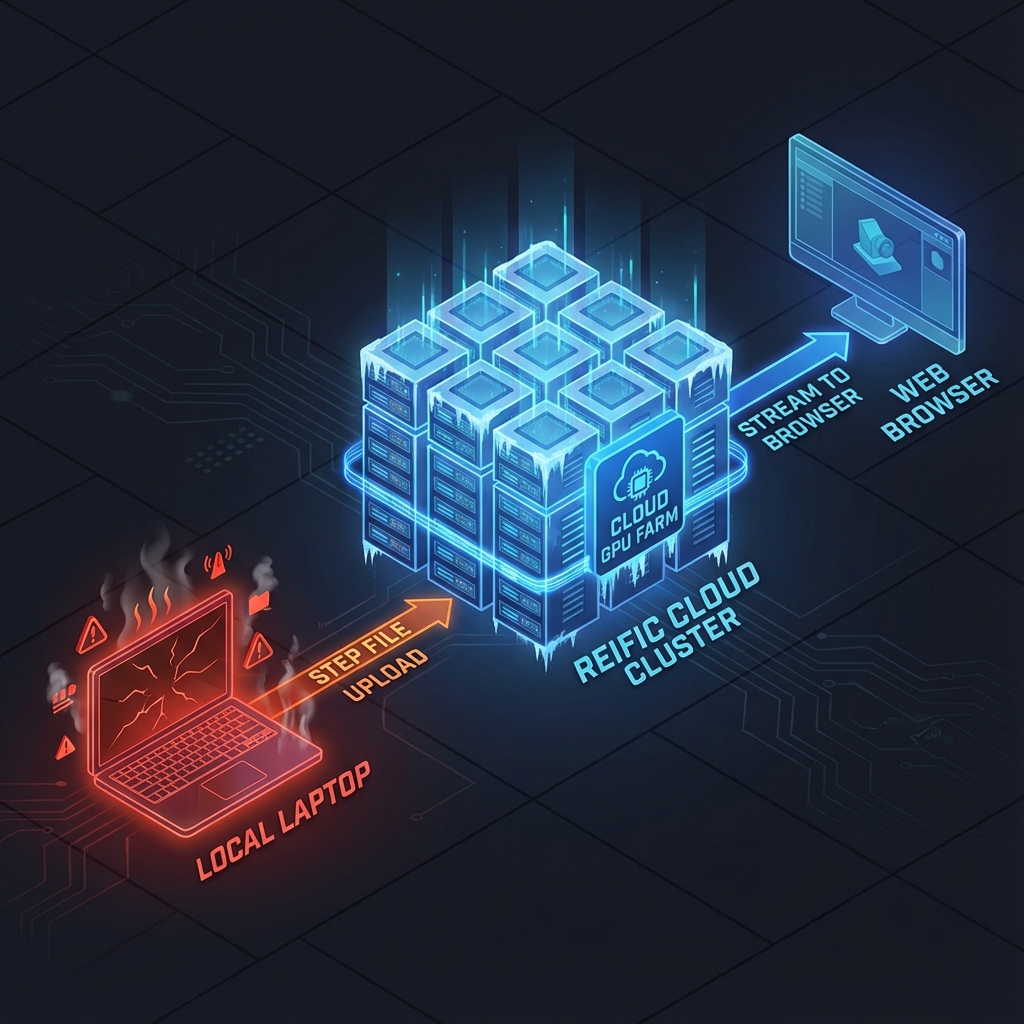
- Upload: Your browser sends the CAD file (or scene description) to the cloud.
- Process: Cloud servers tessellate geometry, load materials, and set up the scene.
- Render: A cluster of GPUs path-traces in parallel—each GPU handles a portion of the image.
- Stream: The final image (or live viewport) is streamed back to your browser.
Why Parallelism Wins
Path tracing is "embarrassingly parallel"—each pixel is independent. If you have 8 GPUs, you can render 8x faster (in theory). Cloud providers have thousands of GPUs available. The ceiling isn't your hardware; it's your provider's capacity.
Part 3: Tradeoffs and Considerations
| Factor | Local Rendering | Cloud Rendering |
|---|---|---|
| Speed | Limited by your GPU | Virtually unlimited |
| Upfront Cost | $1,000–$5,000 GPU | $0 |
| Per-Render Cost | $0 (your electricity) | $0.01–$0.10/render |
| Offline Access | Yes | No (requires internet) |
| Data Security | Data never leaves machine | Depends on provider |
| Machine Usability | Frozen during render | Unaffected |
When to Use Local
- You own a high-end workstation and render infrequently
- Data security policies prohibit cloud uploads
- You're in an environment without reliable internet
When to Use Cloud
- You render frequently and time-to-output matters
- Your hardware is a laptop or Mac without discrete GPU
- Multiple team members share rendering workload
- You need to iterate quickly during stakeholder calls
Part 4: Cost Comparison (Practical Framework)
Instead of one universal price tag, compare the costs that actually drive your decision:
| Cost Driver | Local Rendering | Cloud Rendering |
|---|---|---|
| Hardware | Workstation upgrades + maintenance | Provider pays for GPU fleet |
| Waiting time | You pay with engineer time | You pay to reduce waiting |
| CAD conversion friction | Often manual (exports, mesh cleanup) | Varies (best is CAD-native) |
| Collaboration overhead | Exports, emails, meetings | Links, comments, versioning |
Quick Calculator (Waiting Cost)
Annual waiting cost ≈ renders/week × minutes waiting/render × 52 ÷ 60 × loaded hourly rate.
How Reific's Cloud Works
Our infrastructure is specifically optimized for CAD data:
- NURBS-native ingestion: We don't triangulate on your machine—we do it server-side with industrial kernels.
- Progressive streaming: Preview in seconds; once your model is processed, final frames typically land in ~10 seconds—even for large assemblies.
- Smart caching: Repeated renders of the same model skip geometry processing.
- Enterprise options: Private compute, zero-retention processing for IP-sensitive work.
Key Takeaways
- ✓Path tracing requires billions of ray calculations—GPUs are essential
- ✓Local rendering is limited by your machine; cloud rendering scales compute off-device
- ✓Cloud rendering keeps your laptop responsive during iteration and reviews
- ✓Compare solutions using your own workload and “waiting cost” math
FAQ
Is cloud rendering secure for proprietary designs?
Depends on the provider. Look for zero-retention processing, encrypted transfers, and SOC 2 compliance. See: Zero-Trust Sharing
What internet speed do I need?
For viewport streaming: 10+ Mbps. For file uploads: faster is better, but we compress STEP files before transfer.
Can I use OptiX acceleration with cloud rendering?
If the provider uses NVIDIA RTX GPUs, many renderers can take advantage of OptiX-style acceleration. The speedup depends on your renderer, scene, and settings.
Stop waiting. Start shipping.
Reific runs the render on cloud GPUs: upload once, then iterate in ~10 seconds after processing—on any device.
Test Our Speed