
KeyShot vs. Blender vs. Reific: Which Tool is Right for Engineers?
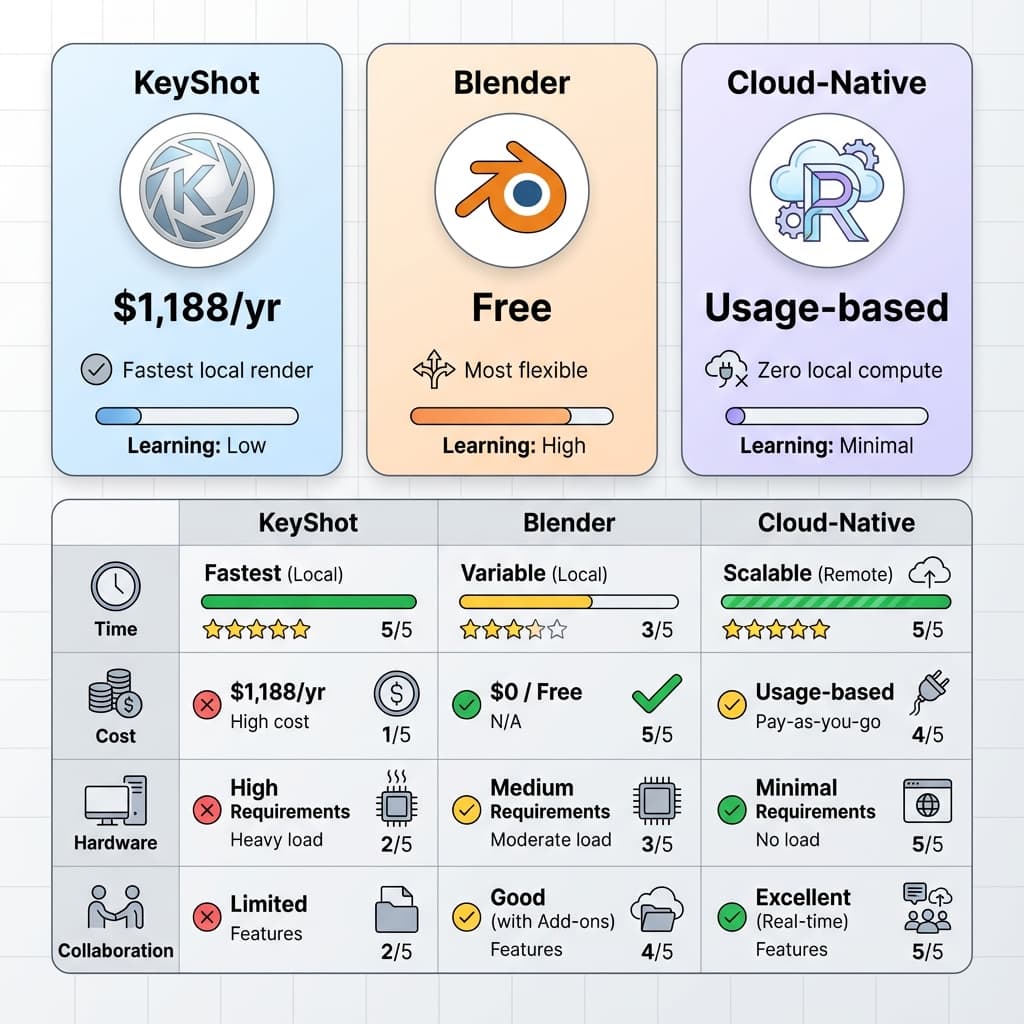
If you're a mechanical engineer who needs to visualize CAD data, you're choosing between three fundamentally different philosophies: the free-but-painful path (Blender), the expensive-but-proven path (KeyShot), or the cloud-native path (Reific).
This guide is an honest comparison. We built Reific, so we're biased—but we'll tell you exactly where KeyShot and Blender beat us, and where they don't.
Executive Summary
| Criteria | Blender | KeyShot | Reific |
|---|---|---|---|
| Cost Model | Free | Paid license | Subscription |
| CAD Import | Conversion required (mesh) | Native STEP/IGES | Native STEP/IGES |
| Time to First “Good” Result | Slower (pipeline + cleanup) | Faster (CAD-friendly) | Fastest (cloud defaults) |
| Collaboration | Manual exports | Manual exports | Link-based sharing |
| Hardware Dependency | High (local GPU helps) | High (local GPU helps) | Lower (cloud compute) |
Pricing, performance, and features vary by version and scene. Use the benchmark below to validate the best fit for your workflow.
Blender: The Open-Source Powerhouse
What It Is
Blender is a free, open-source 3D creation suite. It's used for animation, VFX, game assets, and increasingly, product visualization. The software is maintained by the Blender Foundation and has a massive community.
Strengths for Engineers
Completely free. No subscription, no license dongles.
Can do literally anything—rendering, animation, simulation, video editing.
Thousands of tutorials, add-ons, and free assets available.
Production-quality path tracing that rivals paid software.
Weaknesses for Engineers
Blender cannot read STEP, IGES, or Parasolid. You must convert to OBJ/FBX/STL first, losing NURBS precision and metadata.
Imported CAD meshes almost always need manual repair. See: The Non-Manifold Trap
Blender's interface is notoriously complex. Expect 50–100 hours to become productive.
For realistic materials, you'll need to UV unwrap every part. See: Death to UV Maps
Engineers who want maximum control, have time to invest in learning, and enjoy the technical challenge. Hobbyists, students, and makers on a budget.
KeyShot: The Industry Standard
What It Is
KeyShot by Luxion is a dedicated product rendering application. It's the de facto standard in industrial design, used by companies from Apple to Ford. The software is known for its drag-and-drop material system and tight CAD integrations.
Strengths for Engineers
Native import for SolidWorks, CATIA, Creo, NX, and STEP. Parts, assemblies, and metadata come through cleanly.
The interface is simple. Drag a material onto a part; it looks good immediately.
Extensive library of PBR materials, fabrics, metals, plastics.
Used in thousands of product launches. Reliable, stable, well-supported.
Weaknesses for Engineers
KeyShot is paid software; pricing and plans vary.
All rendering happens on your local CPU or GPU. Large assemblies can take many minutes per frame.
Because renders are slow, the feedback loop is slow. Changing camera angle → wait → review → repeat.
Sharing requires exporting images or video. No live links, no commenting on 3D views.
Run a 30-Minute Benchmark (Recommended)
If you want a decision you can defend internally, run the same model through each tool and record the friction points below:
| Test | Blender | KeyShot | Cloud |
|---|---|---|---|
| Time to first usable preview | Record Typical: conversion + cleanup dominates | Record Typical: minutes (native CAD import) | Record Typical: one-time upload + processing |
| Time to a clean 4K still | Record Typical: minutes (GPU + samples vary) | Record Typical: minutes (workstation-dependent) | Record Typical: ~10s after processing (preset-dependent) |
| Material change → updated render | Record Typical: minutes (plus mapping work for realism) | Record Typical: minutes (local render wait) | Record Typical: ~10s after processing (preset-dependent) |
| CAD → final (end-to-end) | Record Typical: hours (conversion + setup) | Record Typical: ~1–2 hours (setup + iterations) | Record Typical: 10–30 min (camera + materials) |
Benchmark takeaway: the gap usually shows up in time-to-first-preview and iteration time. Blender is bottlenecked by CAD → mesh conversion/cleanup, KeyShot by local render waiting, and cloud by a one-time upload/processing step—then ~10s per iteration.
Keep camera, resolution, quality target (samples/denoiser), and lighting as consistent as possible. The point isn’t perfection—it’s relative friction for your real assemblies.
Professional studios with dedicated rendering hardware who need maximum image quality and have established workflows. Companies already invested in the Luxion ecosystem.
Reific: The Cloud-Native Approach
What It Is
Reific is a browser-based CAD visualization platform. You upload STEP files; we handle the rendering on cloud GPUs and stream the result back. There's no software to install.
Strengths for Engineers
After initial processing, renders typically finish in ~10 seconds—even for large assemblies (quality settings vary).
Works on a MacBook Air, Chromebook, or iPad. Your device is just a viewport.
We ingest STEP and IGES directly using industrial NURBS kernels.
Share live links. Viewers don't need software. Pin comments directly on 3D views.
AI assistance that respects your geometry. See: The Geometry Lock Protocol
Considerations
Reific streams results, so a stable connection helps.
Optimized for stills and interactive reviews today; turntables/animations are on the roadmap.
Focused on CAD visualization (not character/organic sculpting workflows).
Integrations and enterprise controls are expanding quickly.
Best For:
Engineering teams who need fast iteration, easy stakeholder sharing, and minimal setup. Companies where render time is blocking the feedback loop.
Total Cost of Ownership: How to Compare
For teams, the biggest cost is usually time—not licenses. Add up these buckets for your workflow:
| Cost Bucket | Blender | KeyShot | Cloud |
|---|---|---|---|
| License | $0 | Paid | Subscription or usage |
| Training | Higher | Medium | Lower |
| CAD conversion / cleanup | Often required | Rare | Depends (best is CAD-native) |
| Render waiting | Often high | Medium–high | Lower |
| Sharing / feedback overhead | Manual exports | Manual exports | Link-based workflows |
Quick Calculator (Waiting Cost)
Annual waiting cost ≈ renders/week × minutes waiting/render × 52 ÷ 60 × loaded hourly rate.
The Verdict
Choose Blender If...
- ✓You're a hobbyist or student
- ✓Budget is $0
- ✓You enjoy technical challenges
- ✓You need animation/VFX too
Choose KeyShot If...
- ✓You have dedicated render hardware
- ✓Maximum image quality matters
- ✓Your team already knows it
- ✓You need offline capability
Choose Reific If...
- ✓Iteration speed is critical
- ✓You need easy stakeholder sharing
- ✓Hardware is a bottleneck
- ✓You want minimal setup
Key Takeaways
- ✓Blender is free but often requires conversion and cleanup for CAD
- ✓KeyShot is paid but offers excellent CAD integration
- ✓Reific eliminates hardware dependency with cloud rendering
- ✓Compare tools using a quick benchmark + “waiting cost” math
FAQ
Blender vs KeyShot: Which is better for composition and lighting?
KeyShot excels at quick studio setups with drag-and-drop environments and excellent default lighting. Blender offers more control through its node-based Cycles engine but requires more setup time. For engineers who prioritize speed over artistic control, KeyShot's composition workflow is faster. For those who want cinematic control, Blender's flexibility wins.
How do Blender, Rhino, and KeyShot work together in a CAD workflow?
A common pipeline is: Rhino for NURBS modeling → KeyShot for final renders (using KeyShot's Rhino plugin for live linking). Blender enters when you need animation, VFX, or free rendering. The friction point is always mesh conversion—Rhino's NURBS must become triangles for Blender, which can introduce artifacts.
Is rendering a Blender model in KeyShot a good workflow?
You can export FBX/OBJ from Blender and import into KeyShot, but this is rarely optimal. If your geometry started in Blender, use Blender's Cycles renderer directly. KeyShot's strength is native CAD import—if you're converting between mesh tools, you lose that advantage and add workflow friction.
How does Blender 4/5 compare to KeyShot for CAD rendering?
Blender 4.x improved performance significantly with light linking and faster Cycles rendering. However, the fundamental limitation remains: Blender can't import STEP/IGES natively. KeyShot still wins for direct CAD workflows. Cloud platforms like Reific offer a third option that eliminates both KeyShot's license cost and Blender's conversion overhead.
Can I use Blender for professional work?
Yes—major studios use Blender. The challenge for engineers is the CAD conversion step, not Blender's render quality.
Does KeyShot support GPU rendering?
KeyShot 11+ supports GPU rendering with NVIDIA OptiX. It's significantly faster than CPU mode but still requires local hardware.
What if I need animations?
KeyShot and Blender both support animation. Reific is optimized for stills and interactive 3D reviews today; turntables/video output are on the roadmap.
See Reific in action.
If you want speed and sharing without workstation overhead, Reific is the cloud-native choice—upload once, then iterate in ~10 seconds after processing.
Start Your Free Trial