
The Best KeyShot Alternative for Mac M1/M2/M3 Users in 2026
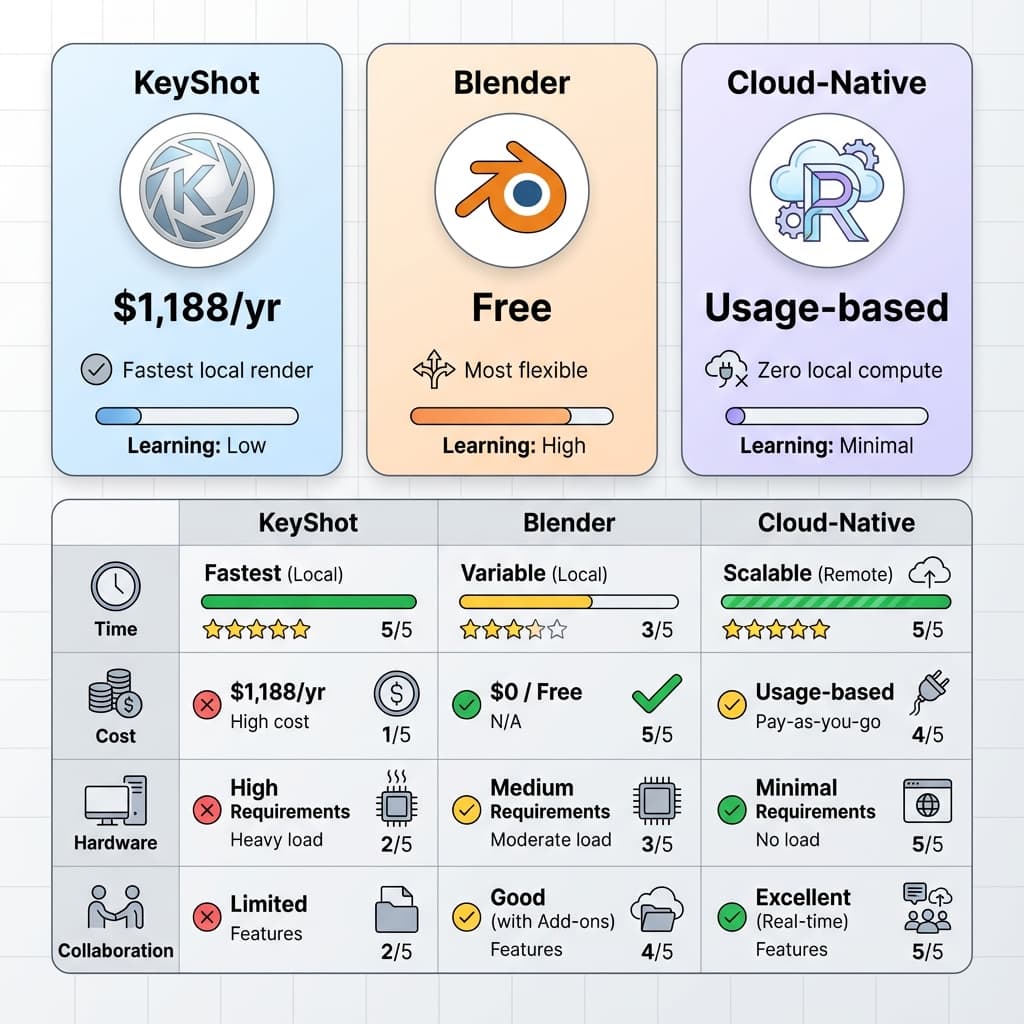
Apple Silicon (M1, M2, M3, M4) changed the game for industrial designers. Laptops finally have the unified memory to handle heavy CAD files. But there is a massive bottleneck: legacy rendering software.
KeyShot was built for a CPU-dominant, Windows-heavy era. While they have made strides to support Apple Silicon, the core architecture still relies heavily on raw hardware compute. If you're looking for a KeyShot alternative for Mac that doesn't drain your battery in 45 minutes or sound like a jet engine, you need to shift your mental model from "local render" to "cloud compute."
Why Legacy Tools Struggle on Apple Silicon
Rendering is fundamentally a math problem. Calculating millions of light bounces (ray tracing) requires immense computational power. Traditional tools approach this in two ways:
- CPU Rendering: Relies on the processor. Mac's M-series chips are incredibly efficient, but prolonged 100% CPU loads cause thermal throttling (especially on MacBook Airs without fans).
- GPU Rendering: Relies on the graphics card. Historically, KeyShot GPU rendering was optimized exclusively for NVIDIA RTX cards (CUDA/OptiX). Apple Silicon uses a totally different GPU architecture (Metal).
The result? Mac users pay a premium for hardware, but get sub-optimal rendering performance compared to a similarly priced Windows desktop with an NVIDIA GPU.
The Real Alternative: Browser-Native Cloud Rendering
The solution isn't waiting for legacy software to rewrite millions of lines of code for Metal. The solution is removing the hardware bottleneck entirely.
This is the philosophy behind Reific. Instead of processing light bounces locally on your Mac's M-chip, Reific offloads the heavy lifting to scalable cloud GPU clusters.
1. Zero Battery Drain
Because the rendering happens on cloud servers, your Mac is essentially just streaming a high-quality video feed of the viewport. You can render a massive 500-part STEP assembly while sitting in a coffee shop, and your battery life will barely drop.
2. Instant Load Times for Large CAD
Importing a 2GB STEP file into local software requires your Mac to parse and tessellate the geometry into a mesh. Reific handles this server-side. You drag and drop the file into your browser, and the cloud infrastructure processes it instantly.
3. Native macOS Experience (Because it's just the Web)
No Rosetta translation layers. No parallel desktop virtual machines. If you have Chrome, Safari, or Arc installed on your Mac, you have access to a world-class rendering engine.
The Verdict for Mac Users
| Feature | Legacy Local Tools | Reific (Cloud-Native) |
|---|---|---|
| Hardware Requirement | High-end CPU or NVIDIA GPU | Any device with a web browser |
| Mac Thermal Load | High (Fans spin up, throttling) | Zero (Handled by cloud) |
| Collaboration | Export heavy .KSP files | Share a secure URL instantly |
If you are committed to the Apple ecosystem but frustrated by rendering bottlenecks, the era of heavy local installs is over. The best KeyShot alternative for your Mac isn't another desktop app—it's the cloud.