
Blender vs KeyShot vs Reific: The 2026 Product Design Showdown
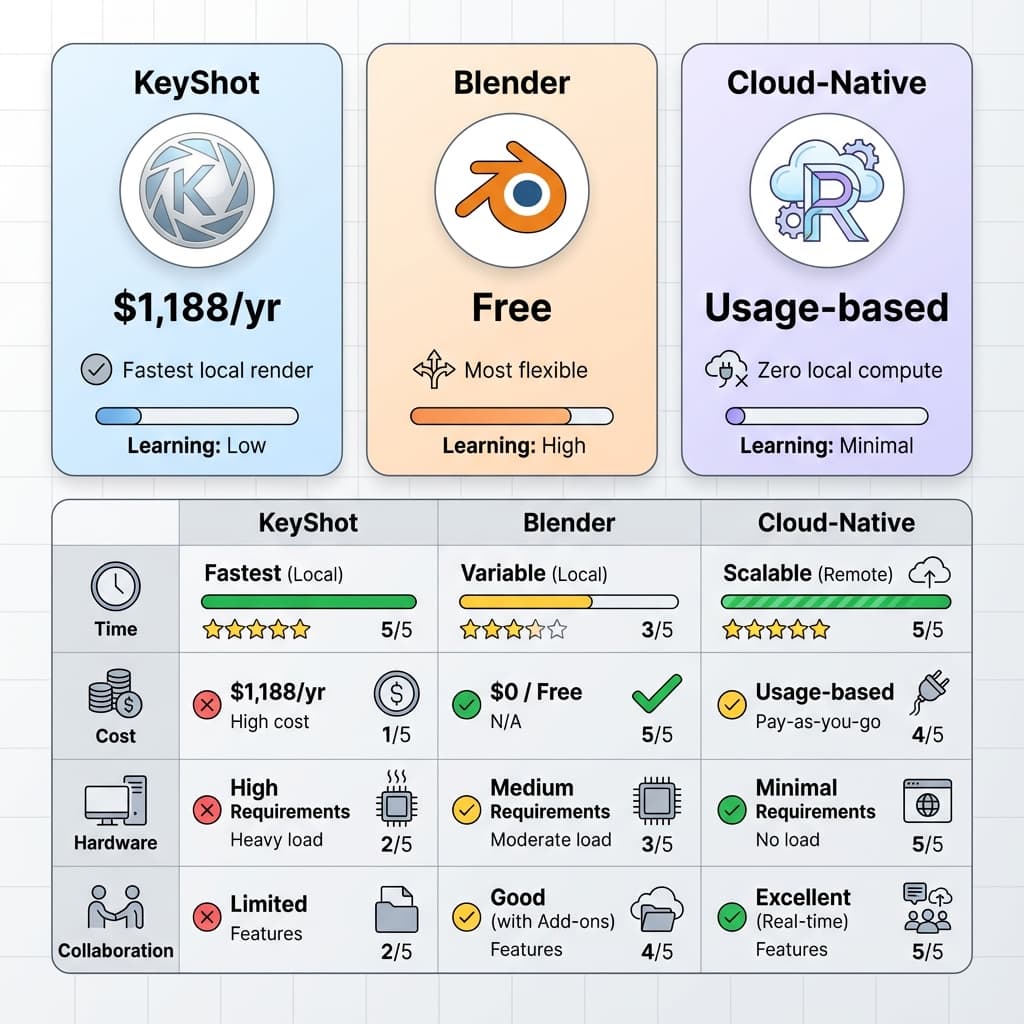
For industrial designers and product engineers, choosing the right visualization software dictates your entire workflow. Make the wrong choice, and you'll spend more time fighting UV maps and waiting for loading bars than actually designing.
Today, the market is split into three distinct categories. Let's break down the realities of using Blender, KeyShot, and Reific in a fast-paced production environment.
1. Blender: The Open Source Powerhouse
Blender is incredible. It is free, backed by a massive community, and capable of producing Hollywood-level CGI. However, for CAD engineers, it presents a steep learning curve.
- The Pros: 100% free. Unmatched flexibility for polygon modeling and animation. Massive library of third-party add-ons.
- The Cons: It is not a CAD tool. Importing NURBS data (like STEP files) often requires paid third-party meshing tools. You have to manually manage UV unwrapping for complex materials. It requires a powerful local GPU.
- Best For: Freelancers with no software budget, or studios that need deep, custom CGI animation capabilities.
2. KeyShot: The Legacy Standard
KeyShot has been the industry standard for a decade. It was built specifically for engineers to quickly apply materials to CAD models without dealing with the complexities of polygon modeling.
- The Pros: Excellent native CAD import. Huge built-in material library. Very fast to set up a basic studio lighting scene.
- The Cons: Extremely expensive (subscription model). Heavily reliant on local hardware. Collaboration is painful (sending massive .KSP files). Poor performance on Apple Silicon without cloud add-ons.
- Best For: Traditional enterprise teams with massive hardware budgets and established local workflows.
3. Reific: The Cloud-Native Engine
Reific represents the modern shift toward browser-based compute. It combines the CAD-friendly approach of KeyShot with the infinite scalability of cloud architecture.
- The Pros: Zero hardware requirements—runs smoothly on an M1 MacBook Air or an old ThinkPad. Native CAD import with automatic tessellation. Instant URL-based sharing for client feedback.
- The Cons: Requires an internet connection. Not suited for offline, highly secure defense environments where data cannot leave the local network.
- Best For: Modern engineering teams, agencies with distributed workforces, and Mac users who want high-end rendering without buying an expensive PC.
The Decision Matrix
| Priority | Winner | Reason |
|---|---|---|
| Lowest Cost | Blender | It's free (if you don't value your time setting up CAD imports). |
| Hardware Independence | Reific | Cloud rendering means your laptop doesn't matter. |
| Client Collaboration | Reific | URL sharing beats emailing 5GB files. |
| Complex Character CGI | Blender | Unmatched rigging and sculpting tools. |
If your goal is to quickly and beautifully visualize engineering data without fighting your hardware or your software, the era of massive local installations is ending. The future is in the browser.